
Docs/Add a Payment Method During Your Free Trial
Account & billingAdd a Payment Method During Your Free Trial
Step-by-step guide to adding a payment method securely through the Stripe customer portal before your OptionData free trial ends.
On this page
OptionData uses the Stripe customer portal to collect and store payment methods securely. You do not enter card or bank information directly into OptionData.
Adding a payment method does not end your free trial. Your trial continues until its scheduled end date, and any future charge follows the price and terms shown for your subscription.
The Stripe payment-method page does not show a coupon field for trial users. Contact Sales for an eligible first-year promotion code, then enter it on the OptionData Billing page before the trial ends.
Before you start
- Sign in to your OptionData account.
- Complete qualification and explicitly activate your free trial.
- Contact Sales for an eligible promotion code, then enter it on Billing before the trial ends. Billing shows the Stripe-confirmed discount terms after application.
Step 1: Find the trial reminder
When your Pro Plan trial is active and Stripe does not have a payment method for it, OptionData displays a reminder at the top of every dashboard page.
The reminder shows:
- How many calendar days remain in your free trial.
- An Add payment method button that opens Stripe securely.

Select Add payment method.
Step 2: Choose a payment method in Stripe
OptionData redirects you to a Stripe-hosted page. Confirm that the browser address begins with https://billing.stripe.com/ before entering payment information.
On the Stripe page:
- Choose an available payment method. The choices can vary by country and account.
- Enter the required payment and billing details.
- Review the authorization text, then select Add.
You will not see a coupon field on this Stripe page. Contact Sales for an eligible promotion code, then return to OptionData Billing to enter it.
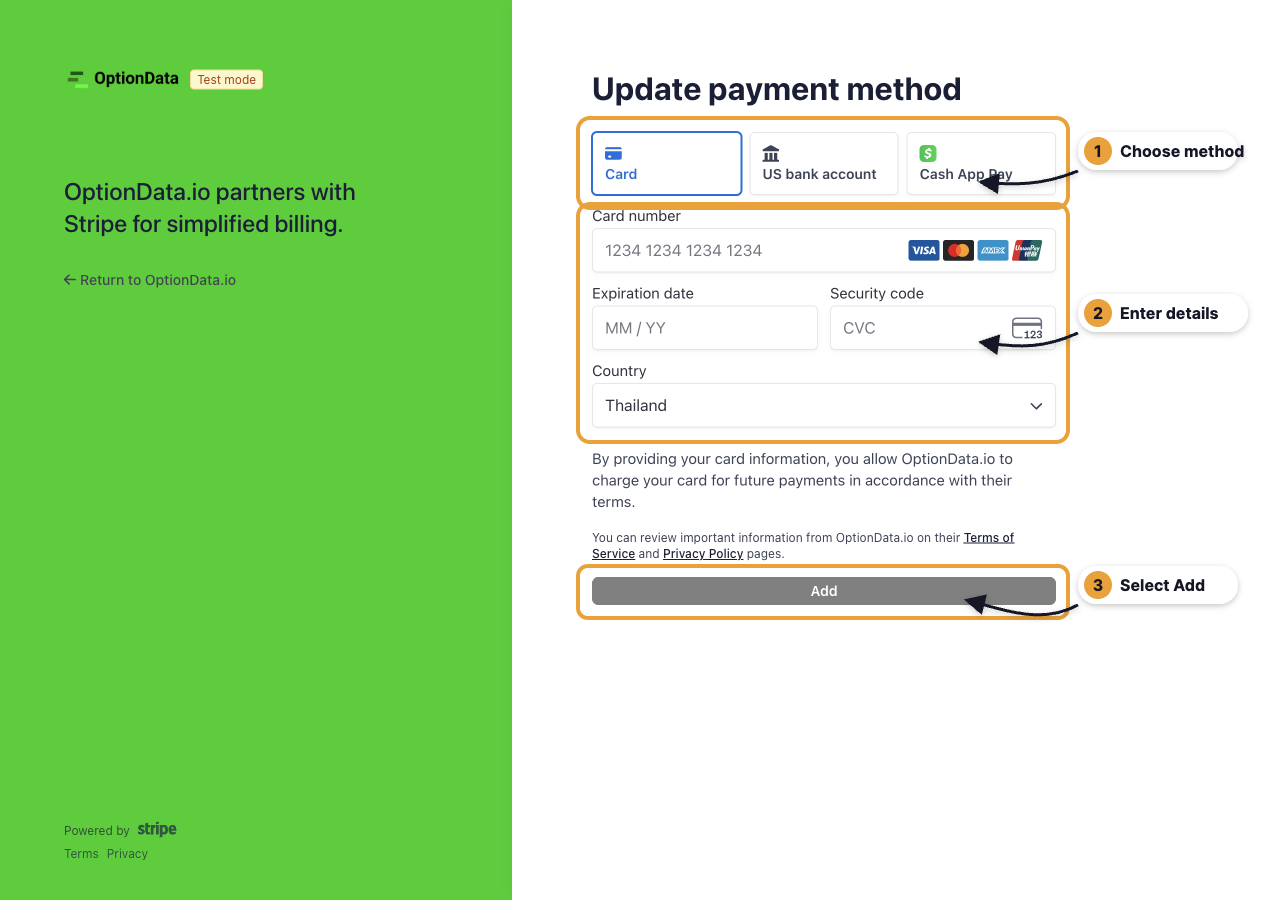
Screenshot note: The example above was captured in Stripe test mode, so it contains no real payment information. Production follows the same steps without the Test mode badge.
Step 3: Return to OptionData
After Stripe saves the payment method, it redirects you back to OptionData. The trial reminder disappears after OptionData confirms that Stripe can charge the trial subscription when it ends.
You can also open Billing to review your trial end date, subscription, standard list price, and any Stripe-confirmed discount.
If the reminder remains visible
- Reload the OptionData page once.
- Open Billing and select Manage Subscription to confirm the payment method in Stripe.
- If Stripe shows the method but OptionData still shows the reminder, contact OptionData Support.
Do not send full card or bank details to OptionData support. Stripe should remain the only place where you enter that information.
Frequently asked questions
Will I be charged immediately?
Adding a payment method does not itself end the free trial. The subscription remains in its trial period until the scheduled end date.
Why do I not see the reminder?
The reminder appears only for an active Pro Plan trial that does not already have a usable payment method. If you already added one, the reminder stays hidden.
Can I update the payment method later?
Yes. Open Billing, select Manage Subscription, and update the payment method in the Stripe customer portal.
Where do I enter the coupon for 50% off my first year?
Contact Sales for the code, then enter it on the OptionData Billing page before the trial ends. It applies to the existing trial; do not enter it in the payment-method portal or start another checkout.
Ask ChatGPT or Claude Code
Copy this prompt, paste it into ChatGPT, Claude, Claude Code, Cursor, or Codex, then add your question. It tells the model to read our public docs first — no API key needed for that step.
You are helping me use OptionData (https://www.optiondata.io/), an OPRA-licensed U.S. equity options data API.

Before answering, fetch these public files (no login required) and treat them as the source of truth:
- https://www.optiondata.io/llms.txt — short product map (same content as https://www.optiondata.io/llm.txt)
- https://www.optiondata.io/llms-full.txt — full API reference
- https://www.optiondata.io/openapi.json — HTTP OpenAPI

Do not invent endpoints, fields, tables, or limits. Prefer `Authorization: Bearer apikey_…` for HTTP APIs. Realtime uses `wss://ws.optiondata.io` with a `token` query parameter.

Products:
- Realtime trades WebSocket: wss://ws.optiondata.io
- Historical SQL: POST https://www.optiondata.io/api/historical/sql
- Option chain: POST https://www.optiondata.io/api/option-chain
- Market structure: GET https://www.optiondata.io/api/v1/market-structure/{symbol}

I am asking about: Add a Payment Method During Your Free Trial
- Markdown: https://www.optiondata.io/md/add-payment-method
- HTML docs: https://www.optiondata.io/docs/add-payment-method

My question: